> ## Documentation Index
> Fetch the complete documentation index at: https://docs.lekalao.com/llms.txt
> Use this file to discover all available pages before exploring further.
# Actions
> Every step of a journey, and its settings.
The **Actions** tab shows the journey from top to bottom, starting with the **Starts when** block (the trigger). On each action: **Move up**, **Move down**, **Edit**, **Delete**, and **Add below**.
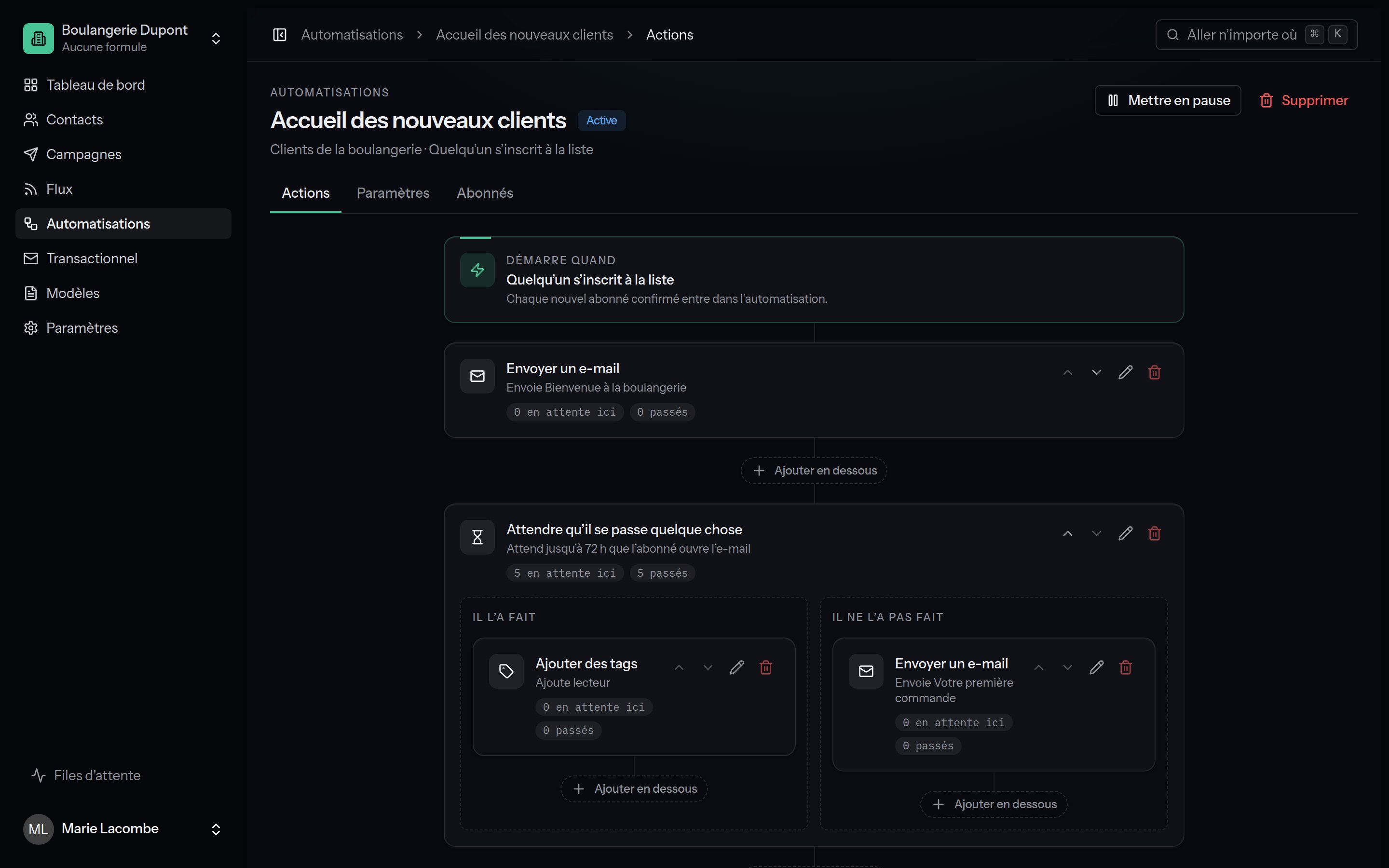 The **If / else**, **A/B split** and **Wait for something to happen** actions open **two paths** side by side; each path has actions of its own.
Deleting an action with two paths also deletes **everything below it**.
Deleting a plain action moves the subscribers waiting there on to the next
one.
## Wait
Holds the subscriber for a while before the next action.
| Mode | Settings |
| ---------------------------------------- | --------------------------------------------------------- |
| **A given time** | A number and a unit: minutes, hours, days, weeks, months. |
| **Until the next given day of the week** | The day and the hour: "until next Monday at 9:00". |
## Wait for something to happen
Gives the subscriber time to act, then takes one path or the other: **They did** / **They did not**.
* **They open an e-mail** of the automation; - **They click in an e-mail**
of the automation; - **They get a tag**; - **They buy something** (a sale
reported since they started waiting).
Past that, it is the **They did not** path. Lekalao looks again every 15
minutes; as soon as the thing happens, the subscriber takes **They did**
without waiting for the time to run out.
## Send an e-mail
Sends one of your [automation e-mails](/automations/emails), in the subscriber's language, through the automations' provider, at that provider's pace. An e-mail deleted in the meantime is simply skipped.
## Add tags / Remove tags
One tag or several. A tag added that does not exist on the list yet is created. Adding a tag can set off another automation.
## If / else
Two paths, **Yes** and **No**, depending on the subscriber:
| Condition | True when |
| -------------------------------- | ------------------------------------------------------------------------------------------------------------------- |
| **has the tag** | They carry the tag. |
| **Attribute** | The attribute (or first name, last name, address) holds the value given; an empty value means the attribute is set. |
| **opened** an automation e-mail | They opened it. |
| **clicked** an automation e-mail | They clicked in it. |
For a condition about an e-mail: wait before checking, to give them time to
open it. To wait for one particular thing with a deadline, the **Wait for
something to happen** action fits better.
## A/B split
Splits the subscribers at random between **Path A** and **Path B**, on a percentage (50 % by default). To compare two series of e-mails, look at their statistics side by side afterwards.
## Subscribe to another list
Also subscribes the person to another list of the team, without confirmation, with their first and last name. A blocked address is not subscribed; the journey carries on.
## Unsubscribe
Unsubscribes the person from the automation's list. Useful at the end of a win-back journey.
## Call a webhook
Sends a JSON `POST` to the address you give:
```json theme={null}
{
"automation": "9d5c2a1e-8f3b-4c7a-9e21-3b8f0c6d4a12",
"action": "0c2d…",
"subscriber": {
"id": "5f1e…",
"email": "ada@example.com",
"first_name": "Ada",
"last_name": "Lovelace"
}
}
```
It waits 10 seconds for an answer. If your server does not reply, the journey **carries on anyway** (the failure is logged): do not lean on this call for a step that must happen. Internal and private addresses are refused.
## Stop the automation
The subscriber goes no further; their journey becomes **Stopped**.
The **If / else**, **A/B split** and **Wait for something to happen** actions open **two paths** side by side; each path has actions of its own.
Deleting an action with two paths also deletes **everything below it**.
Deleting a plain action moves the subscribers waiting there on to the next
one.
## Wait
Holds the subscriber for a while before the next action.
| Mode | Settings |
| ---------------------------------------- | --------------------------------------------------------- |
| **A given time** | A number and a unit: minutes, hours, days, weeks, months. |
| **Until the next given day of the week** | The day and the hour: "until next Monday at 9:00". |
## Wait for something to happen
Gives the subscriber time to act, then takes one path or the other: **They did** / **They did not**.
* **They open an e-mail** of the automation; - **They click in an e-mail**
of the automation; - **They get a tag**; - **They buy something** (a sale
reported since they started waiting).
Past that, it is the **They did not** path. Lekalao looks again every 15
minutes; as soon as the thing happens, the subscriber takes **They did**
without waiting for the time to run out.
## Send an e-mail
Sends one of your [automation e-mails](/automations/emails), in the subscriber's language, through the automations' provider, at that provider's pace. An e-mail deleted in the meantime is simply skipped.
## Add tags / Remove tags
One tag or several. A tag added that does not exist on the list yet is created. Adding a tag can set off another automation.
## If / else
Two paths, **Yes** and **No**, depending on the subscriber:
| Condition | True when |
| -------------------------------- | ------------------------------------------------------------------------------------------------------------------- |
| **has the tag** | They carry the tag. |
| **Attribute** | The attribute (or first name, last name, address) holds the value given; an empty value means the attribute is set. |
| **opened** an automation e-mail | They opened it. |
| **clicked** an automation e-mail | They clicked in it. |
For a condition about an e-mail: wait before checking, to give them time to
open it. To wait for one particular thing with a deadline, the **Wait for
something to happen** action fits better.
## A/B split
Splits the subscribers at random between **Path A** and **Path B**, on a percentage (50 % by default). To compare two series of e-mails, look at their statistics side by side afterwards.
## Subscribe to another list
Also subscribes the person to another list of the team, without confirmation, with their first and last name. A blocked address is not subscribed; the journey carries on.
## Unsubscribe
Unsubscribes the person from the automation's list. Useful at the end of a win-back journey.
## Call a webhook
Sends a JSON `POST` to the address you give:
```json theme={null}
{
"automation": "9d5c2a1e-8f3b-4c7a-9e21-3b8f0c6d4a12",
"action": "0c2d…",
"subscriber": {
"id": "5f1e…",
"email": "ada@example.com",
"first_name": "Ada",
"last_name": "Lovelace"
}
}
```
It waits 10 seconds for an answer. If your server does not reply, the journey **carries on anyway** (the failure is logged): do not lean on this call for a step that must happen. Internal and private addresses are refused.
## Stop the automation
The subscriber goes no further; their journey becomes **Stopped**.