> ## Documentation Index
> Fetch the complete documentation index at: https://docs.lekalao.com/llms.txt
> Use this file to discover all available pages before exploring further.
# Send a campaign
> Check it, test it, send or schedule it, then follow the send.
## The Delivery tab
 ### What leaves
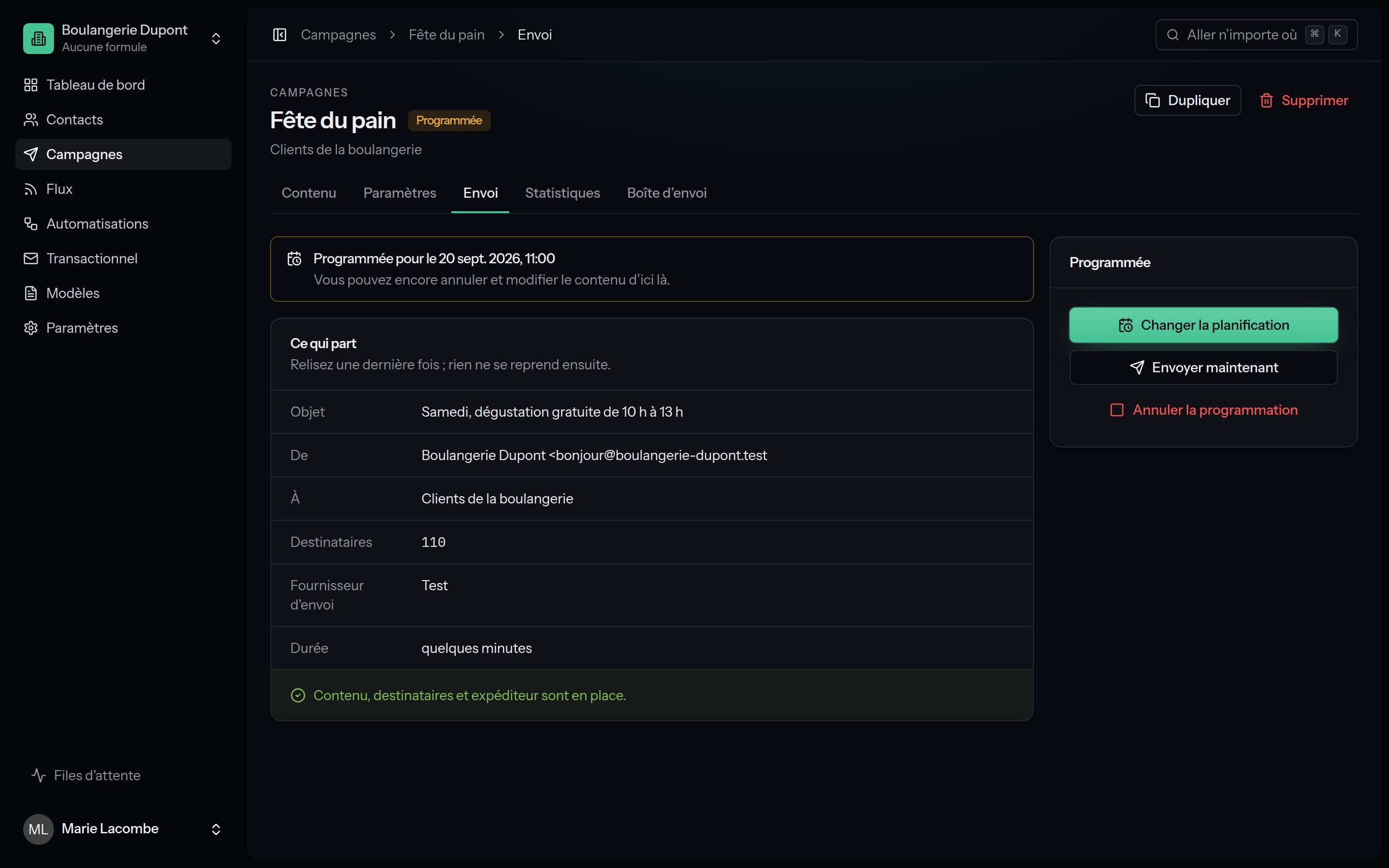
The **What leaves** block, to read once more: **Subject**, **From**, **To** (list and segment), **Recipients** (the exact number), **Mailer** and how long it **takes** at the provider's pace. Anything missing is flagged in orange.
### Ready or not
Under the summary, Lekalao says whether the campaign may go, or lists what to sort out first:
| Message | What to do |
| ----------------------------------------------------------------------------------------------------------------------- | ----------------------------------------------------------------------------------------------- |
| Choose the list to send to. | The **Settings** tab. |
| Write a subject. / Write the content of the e-mail. | The **Content** tab. |
| Set a sender address, on the campaign or on the list. | The campaign's settings or the list's. |
| Configure a mailer in the settings. | [Mailers](/deliverability/mailers). |
| Send a test e-mail from the mailer settings first. | The mailer has not passed its test. |
| This campaign has no recipient. | The list or the segment is empty. |
| Add a visible unsubscribe link to the content, with `{{ unsubscribe_url }}`. | A legal requirement. |
| Set the postal address of your organisation in the general settings. / Add your postal address to the content. | A legal requirement: `{{ organisation.address }}`. |
| An A/B test needs at least two versions. | The **Content** tab. |
| Sending is paused: this team has no valid subscription. / This campaign needs N e-mails and only M are left this month. | [Billing](/account/billing). |
| "…" is not one of your sending domains. / "…" is not verified yet. | A shared installation: the address must belong to a [verified domain](/deliverability/domains). |
## Send now
**Send now** asks for a confirmation ("It goes to N people. E-mails already sent cannot be taken back."). The campaign moves to **sending**:
1. one e-mail is prepared for each recipient, **never twice** for the same person;
2. the e-mails leave through the queue, at the provider's pace, following the spreading, the local hour and the list's sending hours;
3. the big mailboxes are treated gently: Lekalao limits how many go each minute to Gmail, Outlook, Yahoo, Orange and the rest;
4. each e-mail is rendered at the last moment, in the subscriber's language, with their variables.
Addresses on the suppression list, the unconfirmed and the unsubscribed are left out.
**Progress** appears: percentage, sent, waiting, failed.
## Schedule
**Schedule**: a date and a time, read in the installation's time zone (UTC by default). The campaign becomes **scheduled** and leaves on its own at that time; the scheduler checks every minute.
While it is scheduled, you may:
* **Change the schedule**;
* **Send now**;
* **Cancel the schedule**: it becomes a draft you can edit again.
## While it sends
| Action | Effect |
| ----------------------- | --------------------------------------------------------------------------------------------------------------------------- |
| **Stop sending** | The e-mails that have not left will not leave; the campaign becomes **cancelled**. Those already sent cannot be taken back. |
| **Start sending again** | For a campaign that is **paused**: the remaining e-mails leave at once. |
### Paused on its own
Lekalao watches the bounces and the complaints while it sends. Past the thresholds (by default, after 500 e-mails: more than 0.1 % complaints with at least 3 of them, or more than 5 % bounces with at least 10), the campaign **pauses itself**, the reason appears in red, and an e-mail warns whoever created the campaign and the recipients of the list summary (failing them, the team's owners).
Do not resume before you understand why. Many bounces betray an old list,
or one imported without consent; complaints betray people who do not
remember subscribing. Clean the list (an engagement segment, deleting the
unconfirmed) before starting again, or the mailboxes will keep refusing
your e-mails, and not only this campaign's.
See [Sending safety](/deliverability/sending-safety).
### Sends that got stuck
If the workers stopped, the e-mails that have waited too long are queued again every ten minutes. The **Maintenance** page flags a campaign that has been sending for more than six hours.
## After the send
The campaign becomes **sent**. A **summary** goes by e-mail to whoever created it and to the recipients of the list summary, with the first figures. The outgoing webhooks receive the `campaign.sent` event.
To send the same content again: **Duplicate**, then adjust it (onto a "did not open" segment, say).
### What leaves
The **What leaves** block, to read once more: **Subject**, **From**, **To** (list and segment), **Recipients** (the exact number), **Mailer** and how long it **takes** at the provider's pace. Anything missing is flagged in orange.
### Ready or not
Under the summary, Lekalao says whether the campaign may go, or lists what to sort out first:
| Message | What to do |
| ----------------------------------------------------------------------------------------------------------------------- | ----------------------------------------------------------------------------------------------- |
| Choose the list to send to. | The **Settings** tab. |
| Write a subject. / Write the content of the e-mail. | The **Content** tab. |
| Set a sender address, on the campaign or on the list. | The campaign's settings or the list's. |
| Configure a mailer in the settings. | [Mailers](/deliverability/mailers). |
| Send a test e-mail from the mailer settings first. | The mailer has not passed its test. |
| This campaign has no recipient. | The list or the segment is empty. |
| Add a visible unsubscribe link to the content, with `{{ unsubscribe_url }}`. | A legal requirement. |
| Set the postal address of your organisation in the general settings. / Add your postal address to the content. | A legal requirement: `{{ organisation.address }}`. |
| An A/B test needs at least two versions. | The **Content** tab. |
| Sending is paused: this team has no valid subscription. / This campaign needs N e-mails and only M are left this month. | [Billing](/account/billing). |
| "…" is not one of your sending domains. / "…" is not verified yet. | A shared installation: the address must belong to a [verified domain](/deliverability/domains). |
## Send now
**Send now** asks for a confirmation ("It goes to N people. E-mails already sent cannot be taken back."). The campaign moves to **sending**:
1. one e-mail is prepared for each recipient, **never twice** for the same person;
2. the e-mails leave through the queue, at the provider's pace, following the spreading, the local hour and the list's sending hours;
3. the big mailboxes are treated gently: Lekalao limits how many go each minute to Gmail, Outlook, Yahoo, Orange and the rest;
4. each e-mail is rendered at the last moment, in the subscriber's language, with their variables.
Addresses on the suppression list, the unconfirmed and the unsubscribed are left out.
**Progress** appears: percentage, sent, waiting, failed.
## Schedule
**Schedule**: a date and a time, read in the installation's time zone (UTC by default). The campaign becomes **scheduled** and leaves on its own at that time; the scheduler checks every minute.
While it is scheduled, you may:
* **Change the schedule**;
* **Send now**;
* **Cancel the schedule**: it becomes a draft you can edit again.
## While it sends
| Action | Effect |
| ----------------------- | --------------------------------------------------------------------------------------------------------------------------- |
| **Stop sending** | The e-mails that have not left will not leave; the campaign becomes **cancelled**. Those already sent cannot be taken back. |
| **Start sending again** | For a campaign that is **paused**: the remaining e-mails leave at once. |
### Paused on its own
Lekalao watches the bounces and the complaints while it sends. Past the thresholds (by default, after 500 e-mails: more than 0.1 % complaints with at least 3 of them, or more than 5 % bounces with at least 10), the campaign **pauses itself**, the reason appears in red, and an e-mail warns whoever created the campaign and the recipients of the list summary (failing them, the team's owners).
Do not resume before you understand why. Many bounces betray an old list,
or one imported without consent; complaints betray people who do not
remember subscribing. Clean the list (an engagement segment, deleting the
unconfirmed) before starting again, or the mailboxes will keep refusing
your e-mails, and not only this campaign's.
See [Sending safety](/deliverability/sending-safety).
### Sends that got stuck
If the workers stopped, the e-mails that have waited too long are queued again every ten minutes. The **Maintenance** page flags a campaign that has been sending for more than six hours.
## After the send
The campaign becomes **sent**. A **summary** goes by e-mail to whoever created it and to the recipients of the list summary, with the first figures. The outgoing webhooks receive the `campaign.sent` event.
To send the same content again: **Duplicate**, then adjust it (onto a "did not open" segment, say).