> ## Documentation Index
> Fetch the complete documentation index at: https://docs.lekalao.com/llms.txt
> Use this file to discover all available pages before exploring further.
# Contact fields
> What you know about the people you write to, and what kind of value each thing is.
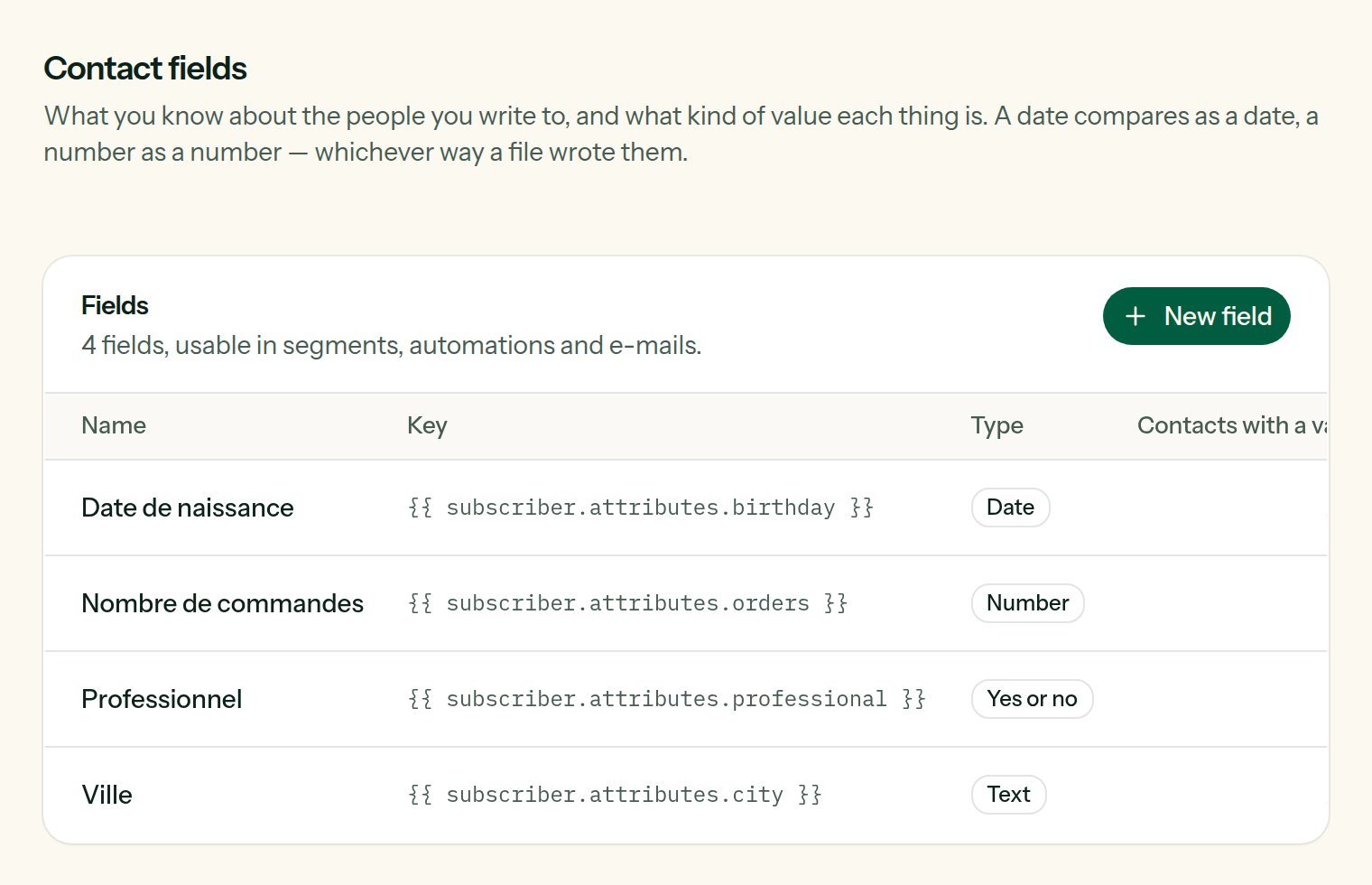
An e-mail address, a first name and a last name come with every subscriber. Everything else you know — a birthday, a plan, a number of orders — is a **contact field**. A field has a **type**, and the type is what makes it useful: a date compares as a date, a number as a number.
Fields belong to the team, not to a list: the person is the same whichever list they are on.
## Create a field
 **Settings → Contact fields → New field.**
What people see: in the import screen, the segment builder, the sign-up page.
What templates and the API call it: `{{ subscriber.attributes.birthday }}`. It never changes afterwards.
How values are kept and compared.
| Type | Kept as | What it allows |
| ------------- | ----------------------- | -------------------------------------------------------------------------------------------------------------------- |
| **Text** | the words as given | equals, contains |
| **Number** | a number (`12`, `12.5`) | greater than, less than — in [segments](/contacts/segments) and in [conditions](/content/personalization#conditions) |
| **Date** | `2026-05-12` | before, after, and the trigger [A date of the subscriber comes round](/automations/triggers) |
| **Yes or no** | `true` or `false` | is, is not. `yes`, `oui`, `1`, `true` are all read as yes |
A value that cannot be read as its type — "soon" in a date — is not lost: it is kept as it was given, and simply matches no comparison of that type. Dates are read in the usual forms (`2026-05-12`, `12/05/2026`) and kept as `2026-05-12`.
You do not have to declare every field first. A value that arrives under an unknown key — from an import, the API or a form — creates a **Text** field of that name by itself. Give it its real type afterwards.
## Change the type
Changing a field from Text to Date rewrites, in the background, what every contact holds under that key into the new shape. A value that cannot be read as the new type is left as it was. The **Contacts with a value** column says how many people the field is known for.
## Remove a field
The field is no longer offered in forms, imports and segments. What contacts hold under its key is kept: create the field again and the values are there.
## Where fields are used
* **Imports**: a column of your file is matched to a field. See [Import and export](/contacts/import-export).
* **The sign-up page**: you choose which fields it asks. See [Pages and pop-up](/contacts/pages-and-popups).
* **Segments**: "birthday is before…", "orders is greater than 3". See [Segments](/contacts/segments).
* **E-mails**: `{{ subscriber.attributes.plan }}`. See [Personalization](/content/personalization).
* **The API**: `attributes` on a subscriber, and [`/v1/fields`](/api-reference/introduction) to manage the fields themselves.
**Settings → Contact fields → New field.**
What people see: in the import screen, the segment builder, the sign-up page.
What templates and the API call it: `{{ subscriber.attributes.birthday }}`. It never changes afterwards.
How values are kept and compared.
| Type | Kept as | What it allows |
| ------------- | ----------------------- | -------------------------------------------------------------------------------------------------------------------- |
| **Text** | the words as given | equals, contains |
| **Number** | a number (`12`, `12.5`) | greater than, less than — in [segments](/contacts/segments) and in [conditions](/content/personalization#conditions) |
| **Date** | `2026-05-12` | before, after, and the trigger [A date of the subscriber comes round](/automations/triggers) |
| **Yes or no** | `true` or `false` | is, is not. `yes`, `oui`, `1`, `true` are all read as yes |
A value that cannot be read as its type — "soon" in a date — is not lost: it is kept as it was given, and simply matches no comparison of that type. Dates are read in the usual forms (`2026-05-12`, `12/05/2026`) and kept as `2026-05-12`.
You do not have to declare every field first. A value that arrives under an unknown key — from an import, the API or a form — creates a **Text** field of that name by itself. Give it its real type afterwards.
## Change the type
Changing a field from Text to Date rewrites, in the background, what every contact holds under that key into the new shape. A value that cannot be read as the new type is left as it was. The **Contacts with a value** column says how many people the field is known for.
## Remove a field
The field is no longer offered in forms, imports and segments. What contacts hold under its key is kept: create the field again and the values are there.
## Where fields are used
* **Imports**: a column of your file is matched to a field. See [Import and export](/contacts/import-export).
* **The sign-up page**: you choose which fields it asks. See [Pages and pop-up](/contacts/pages-and-popups).
* **Segments**: "birthday is before…", "orders is greater than 3". See [Segments](/contacts/segments).
* **E-mails**: `{{ subscriber.attributes.plan }}`. See [Personalization](/content/personalization).
* **The API**: `attributes` on a subscriber, and [`/v1/fields`](/api-reference/introduction) to manage the fields themselves.