> ## Documentation Index
> Fetch the complete documentation index at: https://docs.lekalao.com/llms.txt
> Use this file to discover all available pages before exploring further.

# Pages and pop-up

> A sign-up page Lekalao hosts for you, a pop-up for your website, and landing pages with an address of their own.

Three ways to fill a list without writing a form yourself. All three show the same form, in your [brand](/content/brand) colours and in the language of the list, and all three need **Accept subscriptions from external forms** ticked in the list's **Settings** — see [Subscription forms](/contacts/subscription-forms).

| You have…                                                                 | Use                  |
| ------------------------------------------------------------------------- | -------------------- |
| no website, or no wish to touch it                                        | the **sign-up page** |
| a website, and want the form to come to the visitor                       | the **pop-up**       |
| an advertisement, a flyer, a profile that needs one address and a promise | a **landing page**   |

## The sign-up page

Every list has one, at an address shown in its **Settings → Subscription form** section: nothing to install, a link to put anywhere.
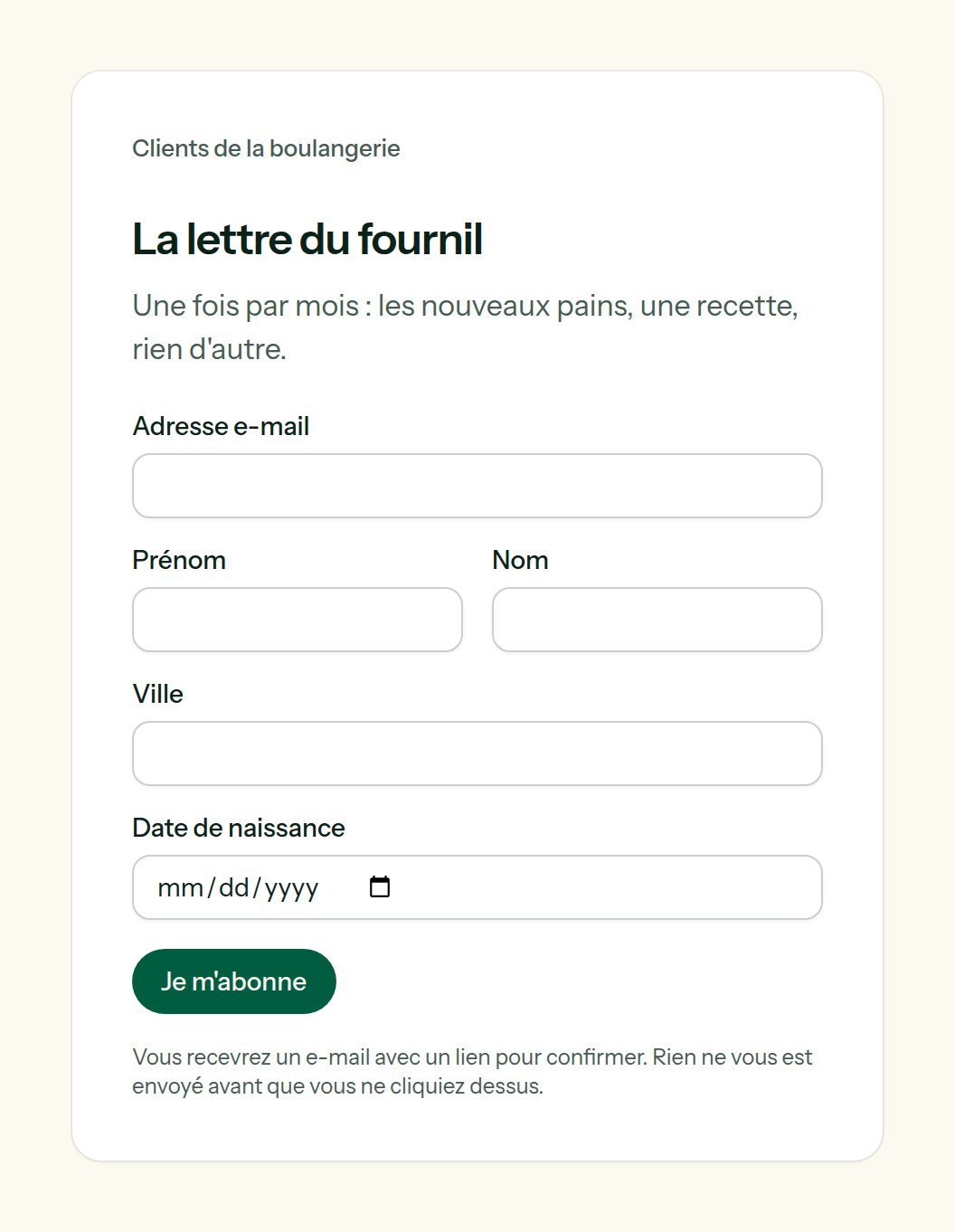
<Frame caption="The sign-up page of a list, in the team's colours and the list's language — French, here.">
  <img src="https://mintcdn.com/lekalao/L23y78v0n8Vzliow/images/en/sign-up-page.png?fit=max&auto=format&n=L23y78v0n8Vzliow&q=85&s=db12d72b578c66bf92c85ee8a2732825" alt="The hosted sign-up page" width="1056" height="1362" data-path="images/en/sign-up-page.png" />
</Frame>

<ParamField path="Title of the page" type="text">
  "Subscribe to", then the name of the list, when empty.
</ParamField>

<ParamField path="What the form asks, besides the e-mail address and the name" type="contact fields">
  Choose among your [contact fields](/contacts/fields), in the order they should appear. Each is asked according to its type: a date picker for a date, a box for a yes or no. A form can only write the fields you chose here.
</ParamField>

The page also takes a few words of introduction and the text of its button. It follows the list's rules: double opt-in, redirects after subscribing, welcome e-mail.

One address receives at most **three confirmation e-mails an hour**, however often the form is filled in: a form cannot be used to pester somebody.

## The pop-up

One line before `</body>` on your website, copied from the same section (**A pop-up for your website**):

```html theme={null}
<script src="https://panel.lekalao.com/subscribe/9d5c2a1e-…/popup.js" data-delay="8" async></script>
```

The sign-up page appears in a window over your site.

| Attribute            | Does                                                               |
| -------------------- | ------------------------------------------------------------------ |
| `data-delay="8"`     | Seconds before it appears. `-1`: never by itself, only on a click. |
| `data-days="30"`     | A visitor who has seen it is left alone for this many days.        |
| `data-lekalao-popup` | Put on any button or link of your page: a click opens the window.  |

```html theme={null}
<button data-lekalao-popup>Get the newsletter</button>
```

The window closes with its cross, the Escape key, or a click outside. It stores one date in the visitor's browser (`localStorage`) and no cookie.

<Note>
  When the list names **Allowed domains**, only those websites can show the pop-up: the browser refuses to frame the page anywhere else.
</Note>

## Landing pages

The **Pages** tab of a list. A landing page is a promise and the form: a headline, a few lines, an image, and an address of its own — `https://panel.lekalao.com/p/spring-letter`.

<Frame caption="The pages of a list, with their visits and the people they brought in.">
  <img src="https://mintcdn.com/lekalao/L23y78v0n8Vzliow/images/en/landing-pages.png?fit=max&auto=format&n=L23y78v0n8Vzliow&q=85&s=e3dcf0c7815dc403bef78e17789bcd9f" alt="The Pages tab of a list" width="2000" height="508" data-path="images/en/landing-pages.png" />
</Frame>

<Steps>
  <Step title="New page">
    **Name** is for you. **Address** is what follows `/p/`: lowercase letters, numbers and dashes. Left empty, it is made from the name; taken, it gets a number.
  </Step>

  <Step title="Write">
    **Headline**, then **Text** in Markdown: `**bold**`, `- lists`, `[links](https://…)`. HTML you type is shown as text, not run. **Image (address)** takes an `https://` address, for instance from your [media library](/content/media-and-blocks).
  </Step>

  <Step title="For search engines and link previews">
    The sentence shown under the title by a search engine, and in the preview when the address is shared.
  </Step>

  <Step title="Public">
    A draft answers "not found" to everybody. Switch **Public** on when it is ready.
  </Step>
</Steps>

<Frame caption="What a visitor sees: the promise, then the form.">
  <img src="https://mintcdn.com/lekalao/L23y78v0n8Vzliow/images/en/landing-page.png?fit=max&auto=format&n=L23y78v0n8Vzliow&q=85&s=5bdc6a73f5c6befcacfd0392993a601b" alt="A landing page" width="1056" height="1642" data-path="images/en/landing-page.png" />
</Frame>

Renaming a page does not change its address: it may already be printed on a flyer.

Each page counts its **visits** (crawlers left out) and its **sign-ups** — the new people it brought in — and shows the rate between the two. Two pages for the same list tell you which promise works.
