> ## Documentation Index
> Fetch the complete documentation index at: https://docs.lekalao.com/llms.txt
> Use this file to discover all available pages before exploring further.
# Segments
> Saved filters, to write to the right people.
A segment is a set of conditions on the subscribers of a list. It copies nobody: it is worked out again every time it is used, so a subscriber joins it or leaves it on their own as their situation changes.
## Create a segment
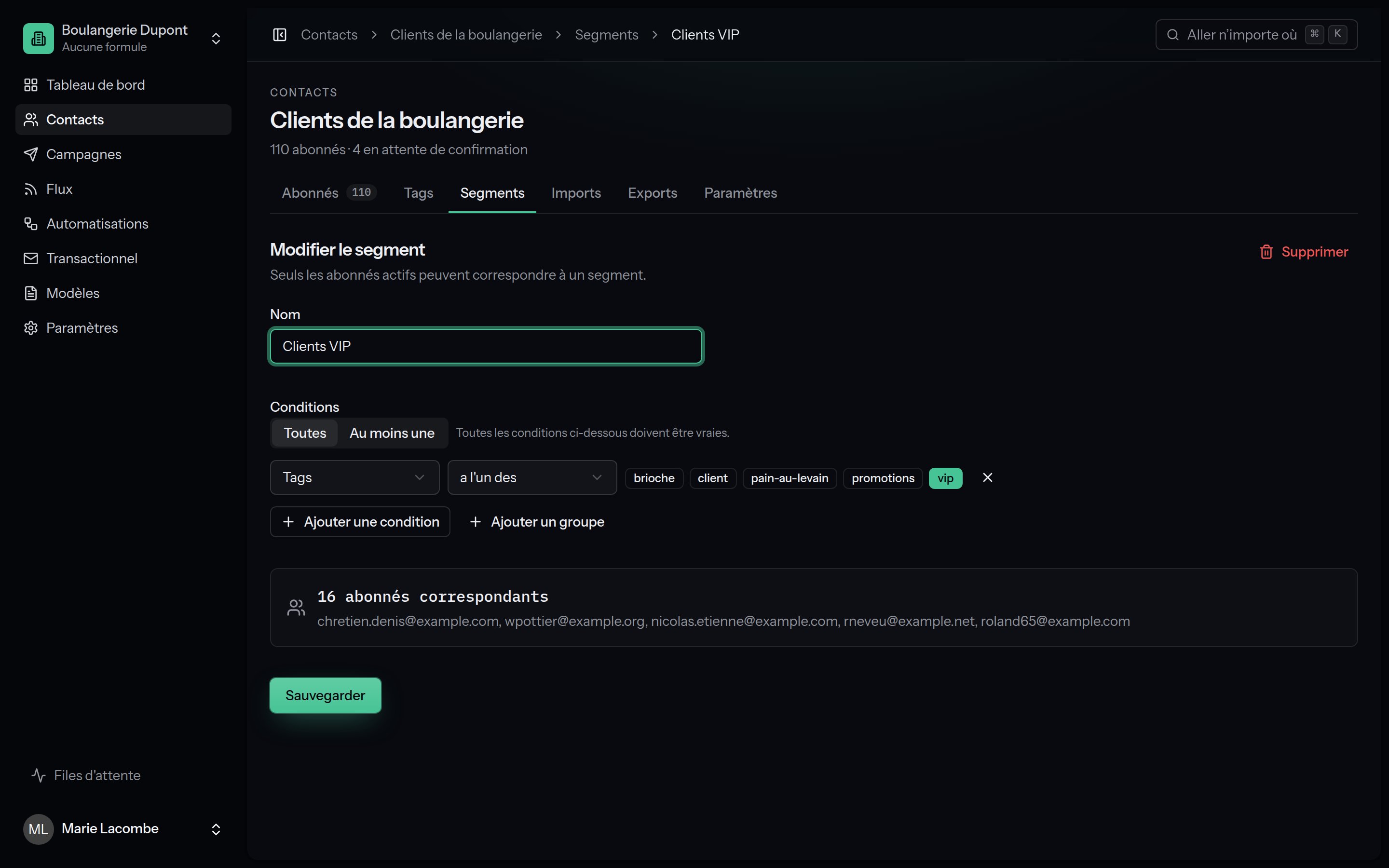
The **Segments** tab of a list → **New segment**. Give it a name, then build the conditions. How many people match, and a glimpse of who they are, keep up as you build.
 ### AND, OR and groups
A segment is a **group** of rules joined by **Match all** (every rule true) or **Match any** (at least one true). A group may hold a subgroup with its own all/any, two levels deep:
> Tag *customer* **AND** (opened *Christmas offer* **OR** clicked a link containing `/order`)
A segment holds 50 rules at most.
## The conditions
Only subscribers whose status is **subscribed** fall into a segment.
| Condition | Operators | Value |
| ------------------------------------------------- | ---------------------------------------------------------------------------------------------------------- | ------------------------------------------------------------------------------------------------------------------------------------------------------ |
| **E-mail address**, **First name**, **Last name** | is, is not, contains, doesn't contain, starts with, ends with, is empty, is not empty | Text (case is ignored) |
| **Tags** | has any of, has all of, has none of | One or several tags |
| **Language** | is, is not | A language. "Portuguese" takes in `pt` and `pt-BR`; "Portuguese (Brazil)" means `pt-BR` alone. The list's language counts for subscribers without one. |
| **Attribute** | is, is not, contains, is greater than, is less than, is a date before, is a date after, is set, is not set | The attribute's name, then text, a number or a date |
| **Subscription date** | is before, is after, is within the last (days), is more than (days) ago | A date or a number of days |
| **Campaign** | received, did not receive, opened, did not open, clicked in, did not click in | A campaign that was sent |
| **Automation e-mail** | received, did not receive, opened, did not open, clicked in, did not click in | An automation e-mail |
| **Link** | clicked, did not click | A link clicked at least once already |
| **Engagement** | opened or clicked in the last (days), did nothing in the last (days) | A number of days |
| **List** | is subscribed to, is not subscribed to | Another list of the team (the same e-mail address) |
## Using a segment
* **A campaign**: in its settings, **Recipients** → the segment instead of **Everyone on the list**.
* **An automation**: **Who may enter** → the segment.
* **An RSS feed**: every campaign of the feed goes to the segment.
* **The subscriber table**: the **Segment** filter, then bulk actions or an export.
* **An export**: export the segment only.
The **View subscribers** button on a row opens the table filtered on the segment.
## Examples
**Engagement** → did nothing in the last **90** days **AND**
**Subscription date** → is more than **30** days ago. Send them a
win-back campaign, then unsubscribe those who still do not react: your
deliverability will thank you.
**Attribute** `birth_date` → is a date after the 1st of the month
**AND** is a date before the 1st of the next one. To send on the day
itself, prefer the date trigger of an
[automation](/automations/triggers#a-date-of-the-subscriber-comes-round).
**Link** → clicked `…/order` **AND** **Tags** → has none of
`customer`.
To create segments through the API, see [Segments through the API](/developers/segments).
### AND, OR and groups
A segment is a **group** of rules joined by **Match all** (every rule true) or **Match any** (at least one true). A group may hold a subgroup with its own all/any, two levels deep:
> Tag *customer* **AND** (opened *Christmas offer* **OR** clicked a link containing `/order`)
A segment holds 50 rules at most.
## The conditions
Only subscribers whose status is **subscribed** fall into a segment.
| Condition | Operators | Value |
| ------------------------------------------------- | ---------------------------------------------------------------------------------------------------------- | ------------------------------------------------------------------------------------------------------------------------------------------------------ |
| **E-mail address**, **First name**, **Last name** | is, is not, contains, doesn't contain, starts with, ends with, is empty, is not empty | Text (case is ignored) |
| **Tags** | has any of, has all of, has none of | One or several tags |
| **Language** | is, is not | A language. "Portuguese" takes in `pt` and `pt-BR`; "Portuguese (Brazil)" means `pt-BR` alone. The list's language counts for subscribers without one. |
| **Attribute** | is, is not, contains, is greater than, is less than, is a date before, is a date after, is set, is not set | The attribute's name, then text, a number or a date |
| **Subscription date** | is before, is after, is within the last (days), is more than (days) ago | A date or a number of days |
| **Campaign** | received, did not receive, opened, did not open, clicked in, did not click in | A campaign that was sent |
| **Automation e-mail** | received, did not receive, opened, did not open, clicked in, did not click in | An automation e-mail |
| **Link** | clicked, did not click | A link clicked at least once already |
| **Engagement** | opened or clicked in the last (days), did nothing in the last (days) | A number of days |
| **List** | is subscribed to, is not subscribed to | Another list of the team (the same e-mail address) |
## Using a segment
* **A campaign**: in its settings, **Recipients** → the segment instead of **Everyone on the list**.
* **An automation**: **Who may enter** → the segment.
* **An RSS feed**: every campaign of the feed goes to the segment.
* **The subscriber table**: the **Segment** filter, then bulk actions or an export.
* **An export**: export the segment only.
The **View subscribers** button on a row opens the table filtered on the segment.
## Examples
**Engagement** → did nothing in the last **90** days **AND**
**Subscription date** → is more than **30** days ago. Send them a
win-back campaign, then unsubscribe those who still do not react: your
deliverability will thank you.
**Attribute** `birth_date` → is a date after the 1st of the month
**AND** is a date before the 1st of the next one. To send on the day
itself, prefer the date trigger of an
[automation](/automations/triggers#a-date-of-the-subscriber-comes-round).
**Link** → clicked `…/order` **AND** **Tags** → has none of
`customer`.
To create segments through the API, see [Segments through the API](/developers/segments).