> ## Documentation Index
> Fetch the complete documentation index at: https://docs.lekalao.com/llms.txt
> Use this file to discover all available pages before exploring further.
# Brand
> The team's colours, typefaces and logo, applied everywhere.
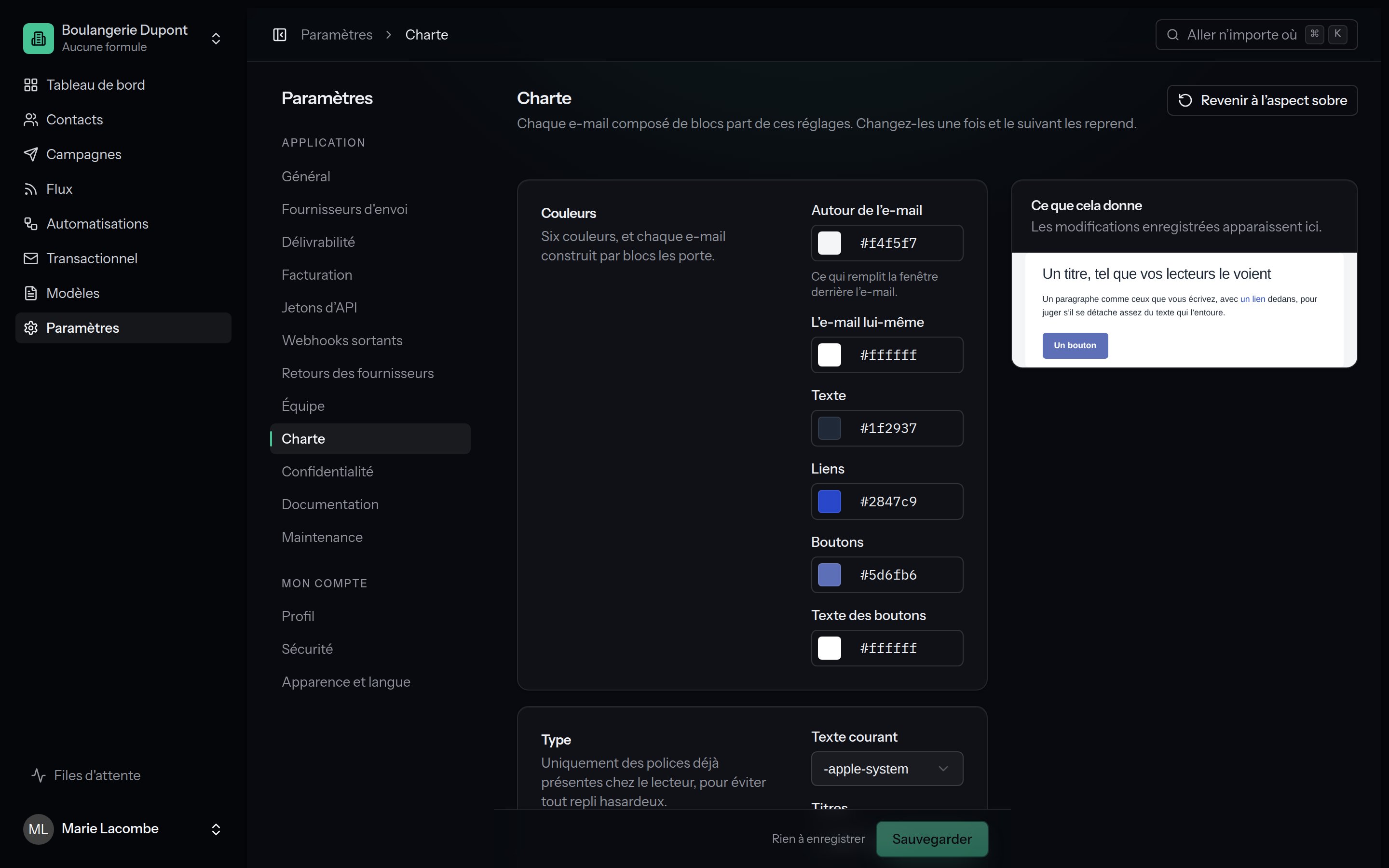
**Settings → Brand**. Every e-mail made of blocks starts from these settings; change them once and the next e-mails follow. The public pages (subscribing, unsubscribing, preferences) also take the button colour, the corner radius and the logo.
 ## Colours
| Setting | Where it shows |
| --------------------- | ----------------------------------------------- |
| **Around the e-mail** | The background of the window behind the e-mail. |
| **The e-mail itself** | The background of the content. |
| **Text** | Body text and headings. |
| **Links** | Links inside the text. |
| **Buttons** | The background of the buttons. |
| **Text on buttons** | The text on the buttons. |
Each colour is picked from the swatch or typed in hexadecimal (`#E44A08`).
Check the contrast between **Buttons** and **Text on buttons**: the [Check
for readers](/content/checks) tool flags text that is too pale.
## Type
**Body** and **Headings**: only typefaces already installed on the reader's machine (system, Georgia, Helvetica, Verdana, Courier), so that no mailbox swaps the typeface for another. **Same as the body** puts the headings on the body typeface.
## Shapes
* **Corner radius** of the buttons, from 0 to 32 pixels;
* **E-mail width**, from 320 to 900 pixels (600 is the usual choice).
## Logo
Upload the logo to the media library (the **Images** button of an editor), copy its address, paste it into **Address of the image** and set its **width** (40 to 600 pixels).
## The preview
On the right, a small e-mail rendered with your settings. It follows the form **live**, before you even save; the line "Follows the form; save to keep it." is a reminder that nothing is written until you do.
**Back to the plain look** puts the original values back into the form.
## What about e-mails that already exist?
An e-mail can always overrule the brand: the **Style** panel of the block editor sets its own colours. The HTML and MJML editors do not use the brand at all, since the layout is yours.
## Colours
| Setting | Where it shows |
| --------------------- | ----------------------------------------------- |
| **Around the e-mail** | The background of the window behind the e-mail. |
| **The e-mail itself** | The background of the content. |
| **Text** | Body text and headings. |
| **Links** | Links inside the text. |
| **Buttons** | The background of the buttons. |
| **Text on buttons** | The text on the buttons. |
Each colour is picked from the swatch or typed in hexadecimal (`#E44A08`).
Check the contrast between **Buttons** and **Text on buttons**: the [Check
for readers](/content/checks) tool flags text that is too pale.
## Type
**Body** and **Headings**: only typefaces already installed on the reader's machine (system, Georgia, Helvetica, Verdana, Courier), so that no mailbox swaps the typeface for another. **Same as the body** puts the headings on the body typeface.
## Shapes
* **Corner radius** of the buttons, from 0 to 32 pixels;
* **E-mail width**, from 320 to 900 pixels (600 is the usual choice).
## Logo
Upload the logo to the media library (the **Images** button of an editor), copy its address, paste it into **Address of the image** and set its **width** (40 to 600 pixels).
## The preview
On the right, a small e-mail rendered with your settings. It follows the form **live**, before you even save; the line "Follows the form; save to keep it." is a reminder that nothing is written until you do.
**Back to the plain look** puts the original values back into the form.
## What about e-mails that already exist?
An e-mail can always overrule the brand: the **Style** panel of the block editor sets its own colours. The HTML and MJML editors do not use the brand at all, since the layout is yours.