> ## Documentation Index
> Fetch the complete documentation index at: https://docs.lekalao.com/llms.txt
> Use this file to discover all available pages before exploring further.
# The editors
> Visual blocks, Markdown, HTML or MJML: choosing how to write.
Every campaign, automation e-mail and template is written in one of four editors. You choose it when you create the e-mail, and you may change it afterwards in the **Editor** field (the content is not converted: changing editor means carrying on from what is written).
| Editor | For whom | The layout |
| ----------------- | ---------------------------------------------- | ----------------------------------------------------------- |
| **Visual blocks** | Everyone, with no code. | Lekalao builds it, in your [brand](/content/brand) colours. |
| **Markdown** | Words first: newsletters, announcements. | Lekalao wraps the text in a clean layout. |
| **HTML** | Those who already have e-mail HTML. | Yours, entirely. |
| **MJML** | Integrators who want responsive that holds up. | Compiled into HTML the mailboxes understand. |
Transactional templates do not offer the block editor.
## The editing screen
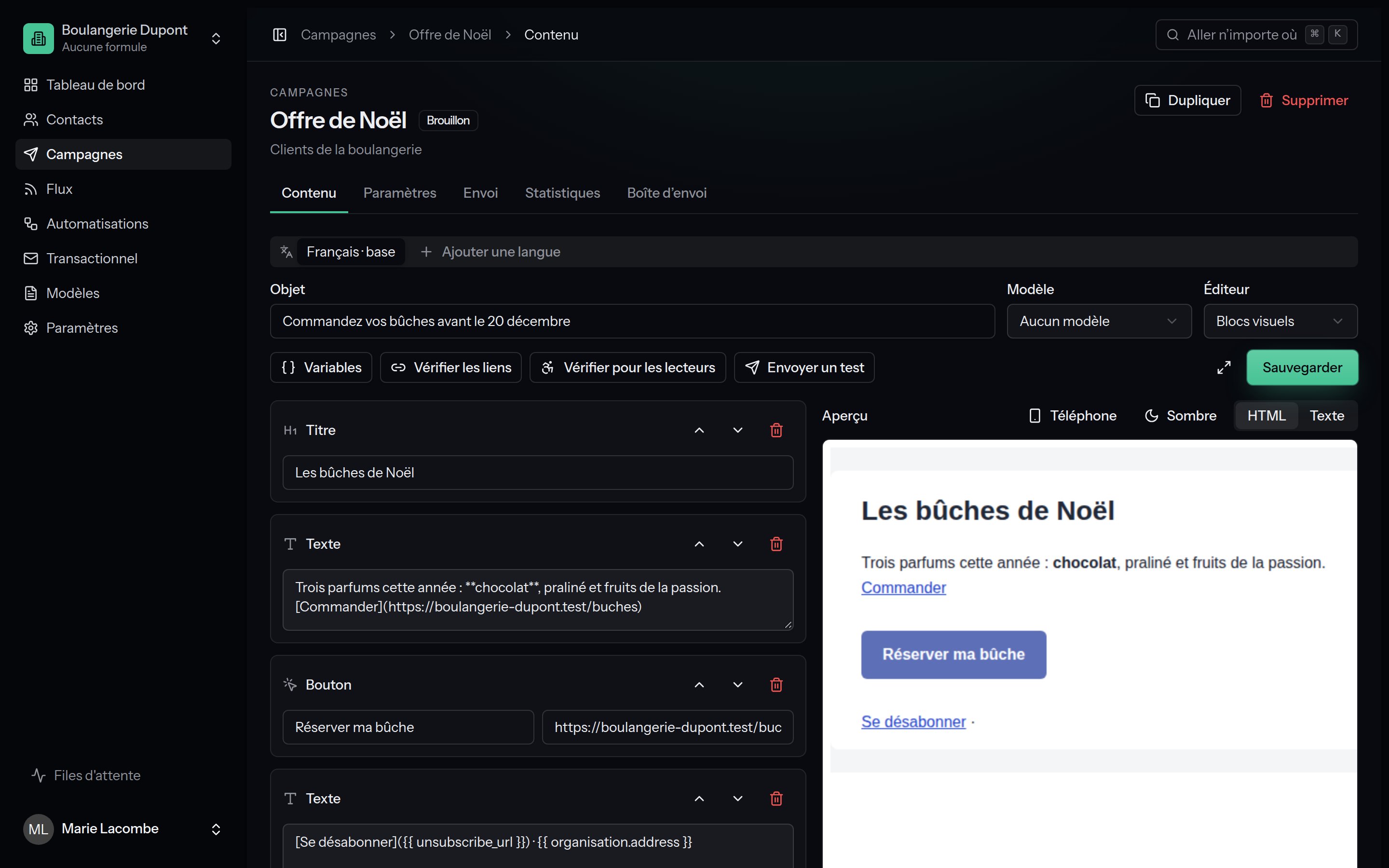 * **The first row** carries what describes the e-mail: **Subject**, **Template**, **Editor**.
* **The second row** carries the tools: **Variables**, **Images**, **Check the links**, **Check for readers**, **Send a test**, then **Save** (⌘ S).
* **On the left** the content, **on the right** the preview, rendered by the sending engine itself and kept up to date as you type. See [Preview and checks](/content/checks).
* The **Focus mode** button folds the navigation away and hides the headers: only the text and its preview are left. Esc to come back.
Above them, the **language tabs** let you write the e-mail in other languages. See [Languages](/content/languages).
## Visual blocks
You stack blocks with **Add a block**, and reorder them with **Move up** and **Move down**.
| Block | Settings |
| ----------------- | ----------------------------------------------------------------------------------------------- |
| **Heading** | The text of the heading. |
| **Text** | A paragraph in Markdown: `**bold**`, `*italic*`, `[link](https://…)`, lists. |
| **Image** | An image from the library or an address, a description (alternative text), a link when clicked. |
| **Button** | The text of the button and its link. |
| **Divider** | A line. |
| **Spacer** | Vertical space you can set. |
| **Editable zone** | In a template only: the place the campaigns will fill. |
The **Style** panel sets, for this e-mail only, the page background, the content background, and the colour of links and buttons. Anything you do not set comes from the team's brand.
**Saved pieces** keeps a footer, a header or an insert to drop back into any e-mail with one click. See [Media library and pieces](/content/media-and-blocks).
## Markdown
```markdown theme={null}
# September news
Hello {{ subscriber.first_name }},
The **shea butter brioche** has arrived. [Reserve yours](https://example.com/brioche).
- Sourdough bread on Sundays
- Tasting on Saturday from 10:00 to 13:00
```
Markdown also takes HTML tags in the middle of the text (an `
* **The first row** carries what describes the e-mail: **Subject**, **Template**, **Editor**.
* **The second row** carries the tools: **Variables**, **Images**, **Check the links**, **Check for readers**, **Send a test**, then **Save** (⌘ S).
* **On the left** the content, **on the right** the preview, rendered by the sending engine itself and kept up to date as you type. See [Preview and checks](/content/checks).
* The **Focus mode** button folds the navigation away and hides the headers: only the text and its preview are left. Esc to come back.
Above them, the **language tabs** let you write the e-mail in other languages. See [Languages](/content/languages).
## Visual blocks
You stack blocks with **Add a block**, and reorder them with **Move up** and **Move down**.
| Block | Settings |
| ----------------- | ----------------------------------------------------------------------------------------------- |
| **Heading** | The text of the heading. |
| **Text** | A paragraph in Markdown: `**bold**`, `*italic*`, `[link](https://…)`, lists. |
| **Image** | An image from the library or an address, a description (alternative text), a link when clicked. |
| **Button** | The text of the button and its link. |
| **Divider** | A line. |
| **Spacer** | Vertical space you can set. |
| **Editable zone** | In a template only: the place the campaigns will fill. |
The **Style** panel sets, for this e-mail only, the page background, the content background, and the colour of links and buttons. Anything you do not set comes from the team's brand.
**Saved pieces** keeps a footer, a header or an insert to drop back into any e-mail with one click. See [Media library and pieces](/content/media-and-blocks).
## Markdown
```markdown theme={null}
# September news
Hello {{ subscriber.first_name }},
The **shea butter brioche** has arrived. [Reserve yours](https://example.com/brioche).
- Sourdough bread on Sundays
- Tasting on Saturday from 10:00 to 13:00
```
Markdown also takes HTML tags in the middle of the text (an `![]() `, a `
`, a ``); for a layout entirely your own, choose the HTML editor. In a **Text** block of the visual editor, on the other hand, HTML is shown as written, not interpreted.
## HTML
Paste or write your HTML in the code editor (with colouring and line numbers). Lekalao:
* **inlines the CSS** of your `