> ## Documentation Index
> Fetch the complete documentation index at: https://docs.lekalao.com/llms.txt
> Use this file to discover all available pages before exploring further.
# Sending domains
> SPF, DKIM, DMARC and a tracking host: proving your e-mails really come from you.
Since 2024, Gmail and Yahoo require bulk senders to be **authenticated**: SPF, DKIM and DMARC published for the domain of the sender address. Without them, your e-mails end up in the junk folder or are refused.
**Settings → Deliverability**.
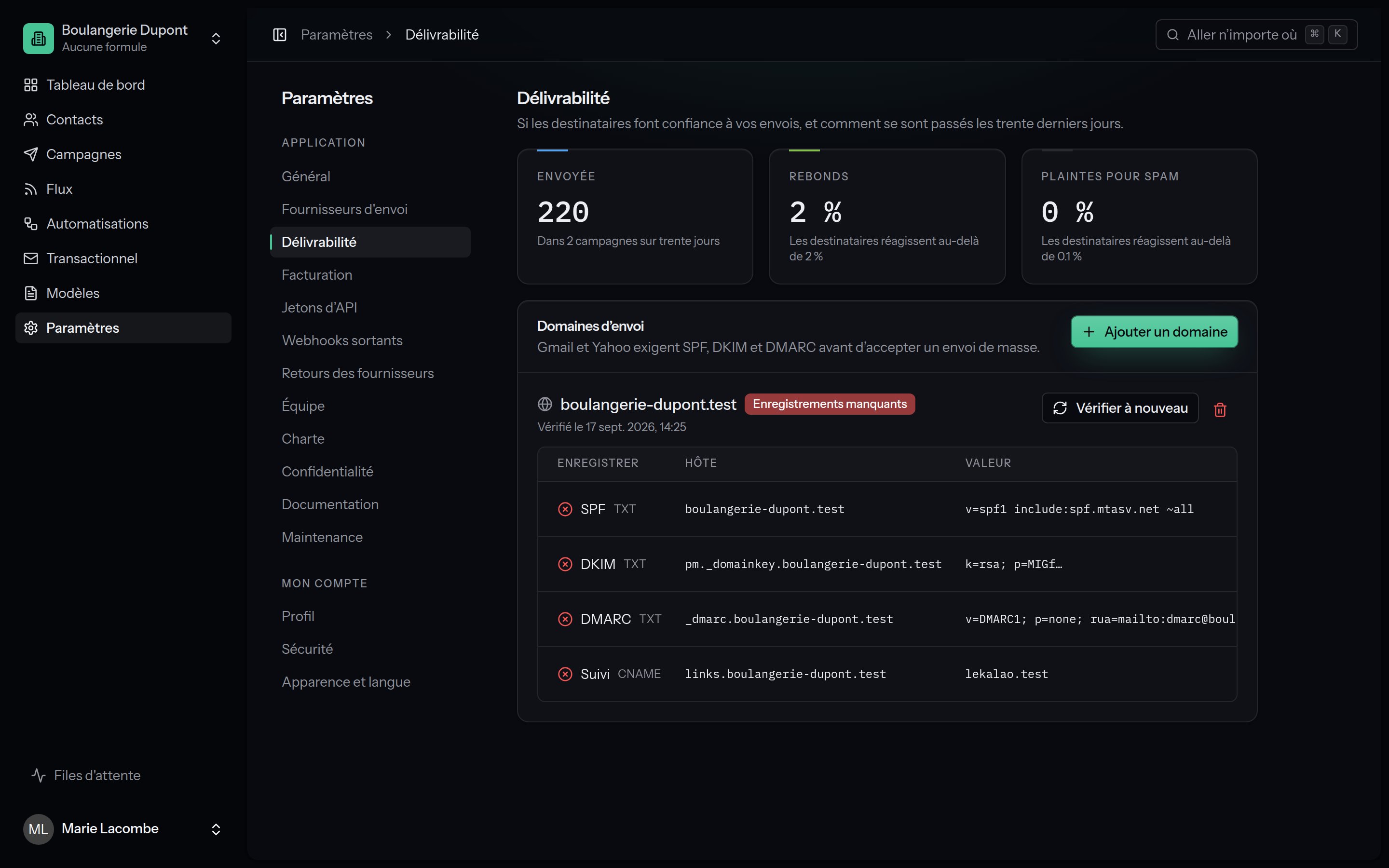 ## The rates of the last thirty days
| Card | When to worry |
| ------------------- | -------------------------------------------------- |
| **Sent** | How many campaign e-mails, and how many campaigns. |
| **Bounces** | Mailboxes react above **2 %**. |
| **Spam complaints** | Mailboxes react above **0.1 %**. |
A card in red is a serious warning: see [Sending safety](/deliverability/sending-safety).
If the organisation's postal address is missing, a banner says so: the law asks for one in every marketing e-mail.
## Add a domain
**Add a domain**:
The domain of your sender address: `dupont-bakery.example` for
`hello@dupont-bakery.example`.
Amazon SES, Postmark, Mailgun, SendGrid, Brevo or Resend: Lekalao works
out the SPF record from it. **I will write SPF myself** when you go through
SMTP or several providers.
The records **your provider** gives you when you add the domain there (SES
gives three, as CNAMEs; Postmark one, as TXT). Copy the host, the type and
the value of each, exactly as they are.
Optional, `click.dupont-bakery.example` for example. See below.
Optional: the address that will receive the aggregated DMARC reports (`rua`).
## Publishing the records
The domain appears with the table of records to create at your DNS host, each with a **Copy** button:
| Record | Host | Type | Value |
| -------- | ------------------------------ | ------------ | ---------------------------------------------------------- |
| SPF | `dupont-bakery.example` | TXT | `v=spf1 include:amazonses.com ~all` |
| DKIM | given by the provider | CNAME or TXT | given by the provider |
| DMARC | `_dmarc.dupont-bakery.example` | TXT | `v=DMARC1; p=none; rua=mailto:dmarc@dupont-bakery.example` |
| Tracking | `click.dupont-bakery.example` | CNAME | the host of your Lekalao |
**One SPF record per domain, no more.** If you already have one (Google
Workspace, Microsoft 365…), add the `include:` to it instead of creating a
second: `v=spf1 include:_spf.google.com include:amazonses.com ~all`.
DMARC starts at `p=none`: mailboxes send you reports without blocking
anything. Once the reports have been clean for a few weeks, move to
`p=quarantine`, then `p=reject`, at your DNS host.
## Checking
Lekalao checks every domain **every night**, and on demand with **Check again** (DNS takes anything from a few minutes to a few hours to spread). Each record has a state:
| State | Means |
| ----------------------------------- | -------------------------------------------------------------------------------------- |
| **In place** | Found, and right. |
| **Missing** | Nothing found at that host. |
| **Found, but not what is expected** | An SPF that does not allow your provider, say, or a DKIM with another value. |
| **Not checked yet** | Just added. |
| **Not used** | Nothing was asked for (no provider chosen for SPF, no DKIM entered, no tracking host). |
The domain is **Verified** when SPF, DKIM and DMARC are in place or not used; otherwise it shows **Records missing**.
## The tracking host
By default, tracked links and the open pixel go through your Lekalao's own address. With a verified tracking host (a `CNAME` to your Lekalao), they go through **your** subdomain: your links carry your name, and spam filters do not tie your reputation to other senders'. The first domain you add becomes the default tracking host.
## A shared installation
When the installation holds several customers (`LEKALAO_REQUIRE_VERIFIED_DOMAIN=true`), the sender address of campaigns, transactional e-mails and the SMTP relay **must** belong to a domain the team added and verified. See [Installation security](/self-hosting/security#who-may-write-in-whose-name).
## Remove a domain
**Remove**: e-mails from that domain are no longer checked against its records, and the tracking host is no longer used. Nothing changes in your DNS.
## The rates of the last thirty days
| Card | When to worry |
| ------------------- | -------------------------------------------------- |
| **Sent** | How many campaign e-mails, and how many campaigns. |
| **Bounces** | Mailboxes react above **2 %**. |
| **Spam complaints** | Mailboxes react above **0.1 %**. |
A card in red is a serious warning: see [Sending safety](/deliverability/sending-safety).
If the organisation's postal address is missing, a banner says so: the law asks for one in every marketing e-mail.
## Add a domain
**Add a domain**:
The domain of your sender address: `dupont-bakery.example` for
`hello@dupont-bakery.example`.
Amazon SES, Postmark, Mailgun, SendGrid, Brevo or Resend: Lekalao works
out the SPF record from it. **I will write SPF myself** when you go through
SMTP or several providers.
The records **your provider** gives you when you add the domain there (SES
gives three, as CNAMEs; Postmark one, as TXT). Copy the host, the type and
the value of each, exactly as they are.
Optional, `click.dupont-bakery.example` for example. See below.
Optional: the address that will receive the aggregated DMARC reports (`rua`).
## Publishing the records
The domain appears with the table of records to create at your DNS host, each with a **Copy** button:
| Record | Host | Type | Value |
| -------- | ------------------------------ | ------------ | ---------------------------------------------------------- |
| SPF | `dupont-bakery.example` | TXT | `v=spf1 include:amazonses.com ~all` |
| DKIM | given by the provider | CNAME or TXT | given by the provider |
| DMARC | `_dmarc.dupont-bakery.example` | TXT | `v=DMARC1; p=none; rua=mailto:dmarc@dupont-bakery.example` |
| Tracking | `click.dupont-bakery.example` | CNAME | the host of your Lekalao |
**One SPF record per domain, no more.** If you already have one (Google
Workspace, Microsoft 365…), add the `include:` to it instead of creating a
second: `v=spf1 include:_spf.google.com include:amazonses.com ~all`.
DMARC starts at `p=none`: mailboxes send you reports without blocking
anything. Once the reports have been clean for a few weeks, move to
`p=quarantine`, then `p=reject`, at your DNS host.
## Checking
Lekalao checks every domain **every night**, and on demand with **Check again** (DNS takes anything from a few minutes to a few hours to spread). Each record has a state:
| State | Means |
| ----------------------------------- | -------------------------------------------------------------------------------------- |
| **In place** | Found, and right. |
| **Missing** | Nothing found at that host. |
| **Found, but not what is expected** | An SPF that does not allow your provider, say, or a DKIM with another value. |
| **Not checked yet** | Just added. |
| **Not used** | Nothing was asked for (no provider chosen for SPF, no DKIM entered, no tracking host). |
The domain is **Verified** when SPF, DKIM and DMARC are in place or not used; otherwise it shows **Records missing**.
## The tracking host
By default, tracked links and the open pixel go through your Lekalao's own address. With a verified tracking host (a `CNAME` to your Lekalao), they go through **your** subdomain: your links carry your name, and spam filters do not tie your reputation to other senders'. The first domain you add becomes the default tracking host.
## A shared installation
When the installation holds several customers (`LEKALAO_REQUIRE_VERIFIED_DOMAIN=true`), the sender address of campaigns, transactional e-mails and the SMTP relay **must** belong to a domain the team added and verified. See [Installation security](/self-hosting/security#who-may-write-in-whose-name).
## Remove a domain
**Remove**: e-mails from that domain are no longer checked against its records, and the tracking host is no longer used. Nothing changes in your DNS.