

Transactional templates are written in code: Markdown, HTML or MJML.
The editing screen
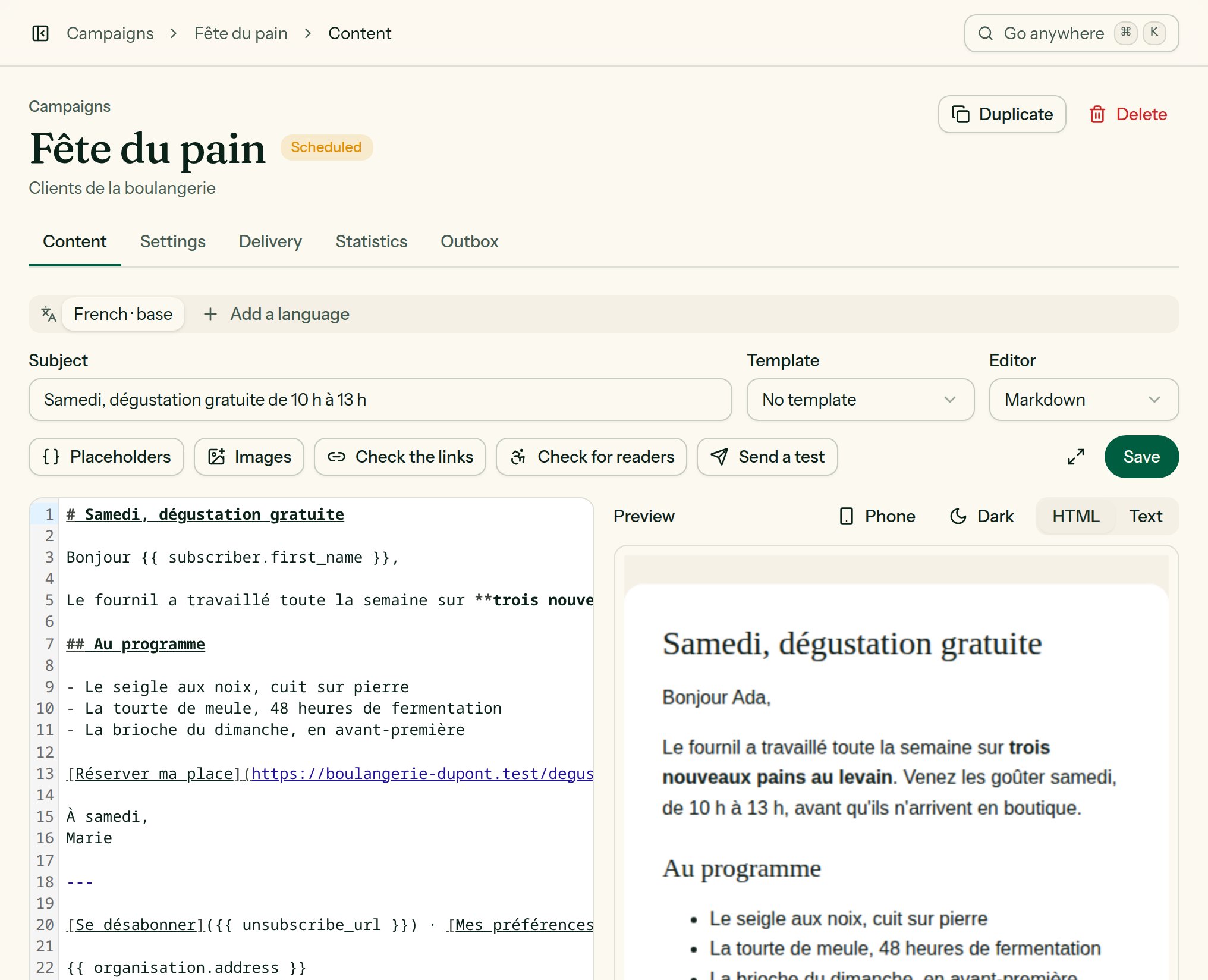
A campaign's content editor: fields, tools, code and preview.
- The first row carries what describes the e-mail: Subject, Template, Editor, and under them the Preview text.
- The second row carries the tools: Placeholders; in a code editor, Images and Link, which write at the cursor; Check the links, Check for readers, Send a test, then Save (⌘ S) with what was last saved beside it.
- On the left the content, on the right the preview, rendered by the sending engine itself and kept up to date as you type. See Preview and checks.
- The Focus mode button folds the navigation away and hides the headers: only the text and its preview are left. Esc to come back.
Preview text
The Preview text is the line mailboxes show after the subject. Left empty, they show the first words of the e-mail instead, often “View in your browser”. Campaigns, automation e-mails, transactional templates and templates all have one.- The counter changes colour past 90 characters, about what most mailboxes show; the field holds 255.
- It takes variables, like the subject, and has a version per language.
- A template’s preview text serves the e-mails poured into it that say none of their own.
Saving
A draft campaign saves itself about two and a half seconds after you stop typing, content and settings alike. Beside the button, it says so: “Saving…”, “Saved · just now”. A scheduled campaign does not: what is saved is what leaves, so its changes wait for Save. Nothing typed is lost on the way out:- A link, another tab of the same campaign or the palette opens Leave without saving?: Stay on the page, Leave without saving, or, where the page can, Save and leave.
- Closing or reloading the browser tab gets the browser’s own question.
- A creation panel asks Discard your changes? before Esc or a click beside it throws away what was typed.
Change the editor
Choosing another Editor for a campaign, an automation e-mail or a transactional template asks first, Switch to …?, and says what will happen.
Every language and every version of an A/B test goes with it. The layout may change a little: check the preview. Until you leave the page, a button in a banner brings the old editor and its content back: Back to … before you have typed, Switch back to … after a conversion (what you changed since is lost).
A template keeps the editor it was created with.
Visual blocks
You stack blocks with Add a block, and reorder them with Move up and Move down.
Each field carries its name above it, and a hint where one helps.
The Style panel sets, for this e-mail only, the page background, the content background, and the colour of links and buttons. Anything you do not set comes from the team’s brand.
Saved pieces keeps a footer, a header or an insert to drop back into any e-mail with one click. See Media library and pieces.
Markdown
<img>, a <table>); for a layout entirely your own, choose the HTML editor. In a Text block of the visual editor, on the other hand, HTML is shown as written, not interpreted.
HTML
Paste or write your HTML in the code editor (with colouring and line numbers). Lekalao:- inlines the CSS of your
<style>tags intostyleattributes, keeping the media queries; - builds the text version;
- rewrites the links for click tracking, when tracking is on.
MJML
Drag-and-drop designer
Columns, images, buttons and social links, dragged into place; undo and redo; a look per device. Where the installation offers it, choose Drag-and-drop designer as the editor when you create the campaign or the automation e-mail.- Images go to your media library, like everywhere else.
- Variables are offered as merge tags in the text toolbar, and the whole of Liquid works in a text block.
- The design is a whole e-mail: it does not go inside a template.
The designer is Unlayer’s, loaded from unlayer.com while you edit. That is why it is off unless the installation’s administrator switches it on: until then it is not offered, and the four other editors run entirely on the installation. Your e-mail is kept in Lekalao — the design and the HTML it exports — and sending never calls Unlayer. Where it is off, an e-mail designed before is sent as it is, and its page says “The designer is turned off on this installation.”: to change it, switch to the HTML editor, which keeps what the designer exported.
Help with the words
On an installation whose administrator named a language model, two buttons appear in the campaign’s Content tab. Without one, they do not exist.- Suggest, next to the subject: five subjects for the e-mail being written, in the language of the list, none of which a filter or a reader would hold against you. Click one to take it.
- Reword: paste a passage, choose Clearer, Shorter, Friendlier or More formal, and copy back what you like. Facts, links and
{{ placeholders }}are kept.